Callback Actions
This page shows how Callback Actions in Fast Track CRM can trigger automated workflows, communicate with external systems, and unlock new possibilities for personalised player experiences.
Callback Actions let FT CRM communicate directly with external systems whenever an Activity fires. Whether you need to pull real-time data from your platform into the CRM, or push player events out to a third-party API, Callbacks make it happen automatically — behind the scenes, without manual work.
There are two types of Callback Action: GET (FT CRM requests data from your system) and POST (FT CRM sends data to your system). Understanding which type fits your use case is the key to unlocking this feature.
🛠️ How it works
Think of it as a chain reaction:
GET: FT CRM fires → sends a request to your API → your system returns structured data → FT CRM uses that data to populate a dropdown or drive logic in the Activity.
POST: FT CRM fires → sends player or campaign data to your API endpoint → your external system receives it and acts on it (e.g. applies a tag, credits a bonus, updates a player record).
GET Callbacks — Pulling data into FT CRM
GET callbacks allow FT CRM to dynamically fetch lists or values from your platform when an Activity is being configured. This is useful when you want CRM users to be able to select from live options — such as bonus types, game titles, language settings, or player tags — that live in your system rather than being hardcoded in FT CRM.
What your API needs to return
For GET callbacks to work, your endpoint must return data in the following standardised format:
json
Each item in the data array appears as a selectable option in the FT CRM interface. The text field is what CRM users see; the value is what gets sent when the Action fires.
Multi-brand support
If your platform serves multiple brands, your API can be configured to accept a brand or origin parameter so the correct dataset is returned per brand. Single-brand operators can use a static endpoint without this parameter.
Things to keep in mind
GET callbacks require your team to adapt your existing API to match the response format above. For most partners this is straightforward, but it's worth confirming with your technical team before building workflows that depend on it.
POST Callbacks — Pushing data to external systems
POST callbacks send data from FT CRM to your platform whenever an Activity fires. This is the right choice when you need real-time event updates, player data, or campaign information delivered to your own API.
Native vs Custom POST callbacks
Native POST callbacks (e.g. Credit Bonus Funds, Credit Bonus Code) are pre-configured integrations. You don't need to specify a URL, method, or authentication — these are handled automatically by FT CRM. Native callbacks are ready to use as long as your integration supports them.
Custom POST callbacks require you to provide your API endpoint, authentication details, and a JSON payload structure. You can use dynamic placeholders in the payload body to insert player data or values from other action fields at the point of firing. For example:
json
- {action_field:campaign_id} — pulls the value from another field within the same Callback Action
- ["#UserId#"] — dynamically inserts the player's ID from segment data
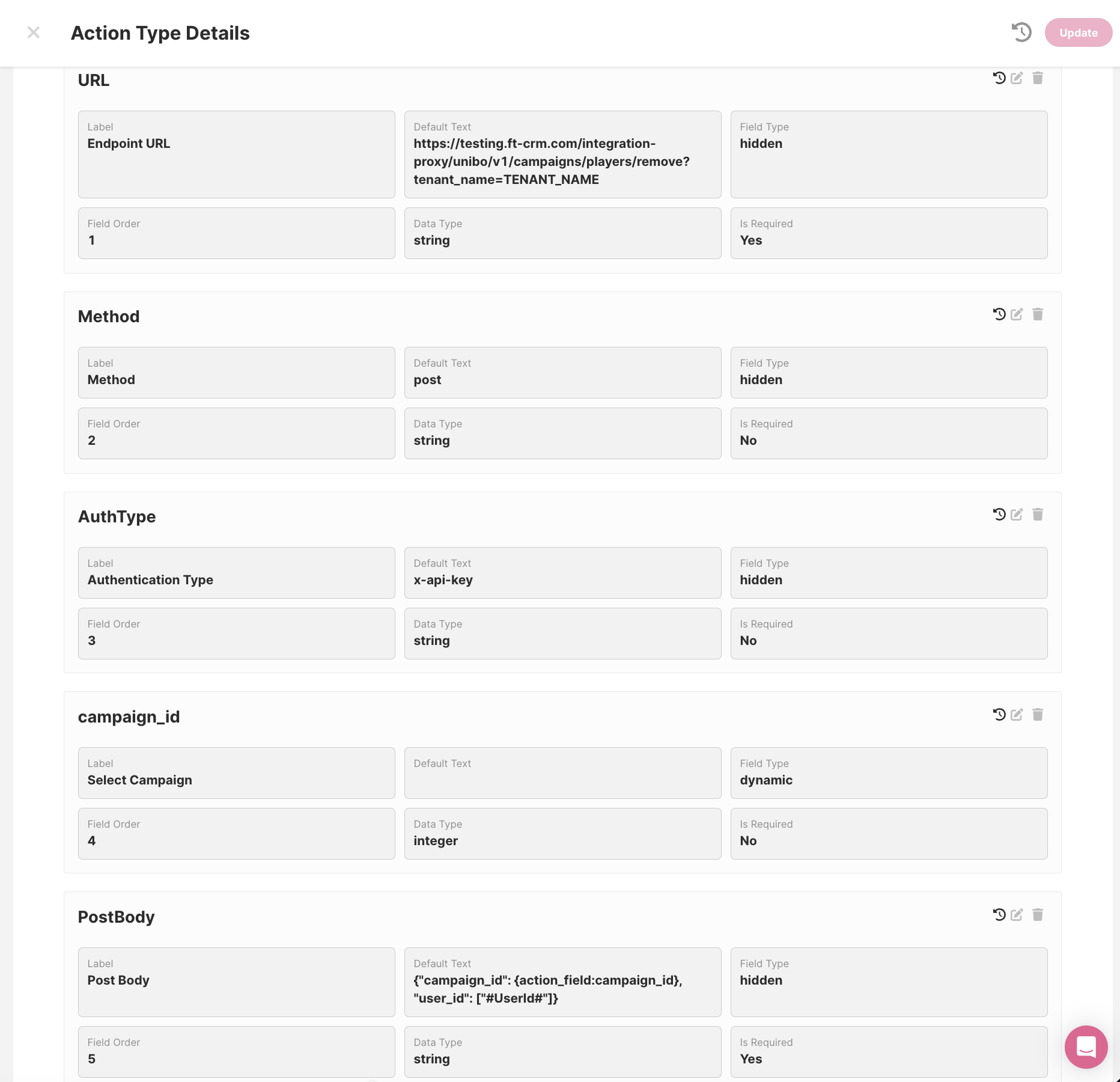
Example POST Custom Callback - Used for the Unibo Integration
Example POST Custom Callback - Used for the Unibo Integration
Multiple Callback Actions
If you need to fire more than one callback from a single Activity, you can create additional actions and set the Notification Type in the format triggercallback.action1, triggercallback.action2, and so on. Each action can have its own URL, method, and payload.

triggercallback.example
triggercallback.example
Callback Actions are also supported in Rewards! To use them make sure you:
- Follow the triggercallback.examplename format
- Toggle on the "Rewards Enabled" setting

💡 Use Cases & Inspiration
Cancel a Bonus on Withdrawal Request
If a player requests a withdrawal while holding an active bonus, FT CRM can automatically fire a Callback to your API to cancel that bonus — no manual intervention required.
Refer-a-Friend Tracking
When a referred player makes their first deposit, a Callback Action notifies your platform with the referral data, triggering the referrer's bonus automatically.
Bonus Bot Integration
When a player opens chat and requests a bonus, the system checks eligibility and — if the player qualifies — fires a Callback to credit the bonus directly via your API.
Internal Loyalty Programme Sync
Send real-time bonus and reward data from FT CRM to your in-house loyalty system, keeping player points, tiers, and statuses consistent across platforms without manual updates.
RCS and Advanced Messaging
POST callbacks are used in Rich Communication Services (RCS) integrations to pass text fields and media assets from FT CRM to a messaging provider.
🧱 How to set it up
Full technical setup instructions — including required fields, authentication types, payload structure, and response format requirements — are covered in the Callback Actions Integration Documentation.